
Often times, clients have customers that have projects that utilize the same materials, and because of this, develop quotes in Paladin that can be utilized over again over time. With this, Paladin now has a No Del (no delete) setting.
To activate the No Del setting:
- In Paladin, open the Invoice/Quote module.
- On the bottom of the module, select F6 Recall Transaction.
The Recall Transaction window opens.
- At the top of the Recall Transaction widow, enable Quote – Order.
- On the top far right of the banner, check No Del on any quotes required to use this function.
- On the bottom right of the window, click F12 Recall or cancel out of the window.
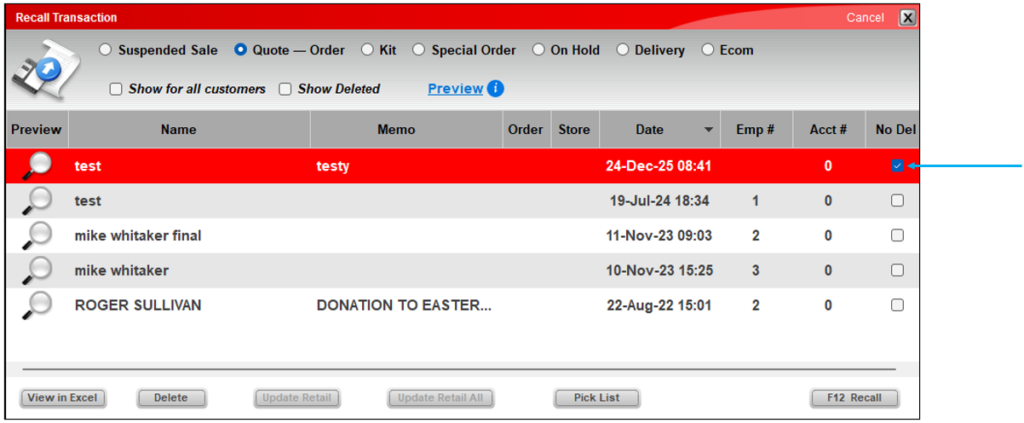
Figure 1: Recall Transaction window/No Del checkbox
No Del quote(s) can be inserted into new invoices using the Insert Quote functionality. For information on this, refer to the Quotes: Insert Quote Feature KBA.
Note: Quotes marked with No Del can only be unmarked or deleted with manager approval.
Important: The Show Deleted option will only show Permanent Quotes which have been deleted, but it will never include normal quotes. Normal quotes are fully deleted when the Delete button is pushed. Over time, data validation will automatically remove deleted proposals and other outdated quotes as part of routine cleanup.
If you have questions or suggestions about this information, contact support@paladinpos.com.