
PaladinGo™ Device Manager and Billing
This article provides information and instruction on the following:
PaladinGo™ Device Manager and Billing
PaladinGo™ billing is monitored through Maintain > PaladinGo™ Utility > Device Manager tab.
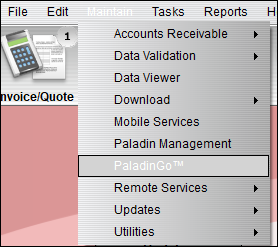
Figure 1: Path to PaladinGo™
Terminals that are active (not deleted in Device Manager) during Paladin’s billing period will be billed.
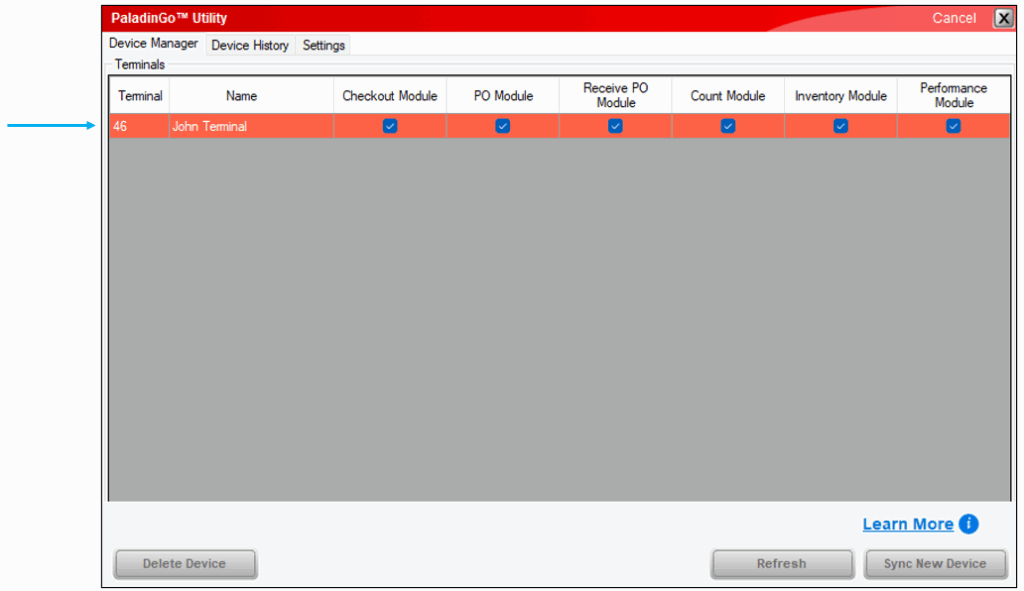
Figure 2: Device Manager
Learn More
By pressing Learn More , the PaladinGo™ window opens providing a link to the PaladinGo™ KBA, which provides a launchpad to PaladinGo™ modules. Another link is provided to the PaladinGo™ Device Manager and Billing KBA, which provides information and instruction on how billing works for use of PaladinGo™.

Figure 3: PaladinGo™ window
If you have questions or suggestions about this information, contact support@paladinpos.com.
*Content is subject to change. For the most recent version, visit the Help Portal.
Printed on: 3/25/26
