
There are two areas that need additional settings in Paladin Configuration:
Employee permissions
The following access permissions can be set for employees to be able to work beyond Checkout in PaladinGo:
- Invoicing
- Inventory
- Reports
- Profit Analyst
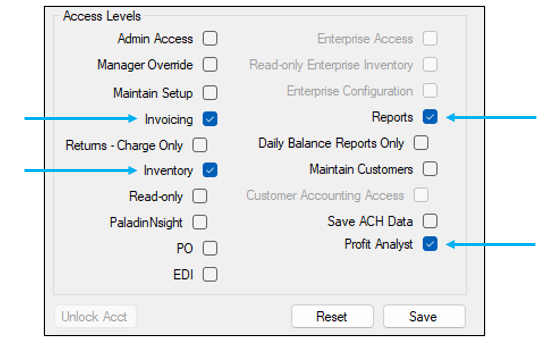
Figure 1: Access Level
To set access levels:
- In Paladin, select File > Setup.
- Select the Employees tab.
- In the Access Levels pane, check applicable levels.
- Click Save, then click Close.
Enabling Inventory alerts when scanning
PaladinGo provides the same RF Unit 15 line functionality of dynamic prompts.
These dynamic prompts are:
- Item Overstock
- Shrinkage
- Low on Stock
- Suggest Clearance
The Item Overstock prompt is determined by the client entering a percentage (%) value in the Overstock Warning Threshold (%) field (shown in Figure 2).
The Shrinkage prompt is given when there is excessive loss. Paladin sets the following default values that the client can override and set values in the following fields (shown in Figure 2).
- Shrinkage warning (Dollars Lost $). The default set by Paladin is 25.0, which can be changed by the client.
- Shrinkage Timespan Warn Threshold (Days). The default set by Paladin is 180, which can be changed by the client.
The Low on Stock threshold prompt is given when stock needs are under an expected quantity.
Items not performing may also be considered for a clearance item..
There is also additional information displayed:
- Wasted. This is determined when investment dollars are tied up in inventory that is not selling. These dollars represent wasted opportunity.
- In the General drop-down list: Gross Margin Return On Investment (GMROI). This is a measurement of a store’s investment performance.
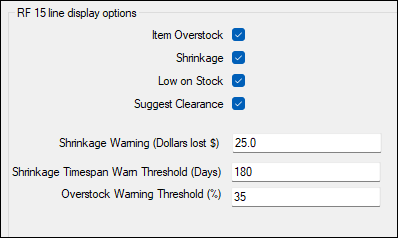
Figure 2: Inventory alerts
To set alerts:
- In Paladin, select File > Setup.
- Select the Company tab.
- In the RF 15 line display options pane, check applicable options.
- Set Shrinkage Warning (Dollars lost $). The default is 25.0
- Set Shrinkage Timespan Warn Threshold (Days). Default is 180.
- Set Overstock Warning Threshold (%). Default is 35
- Click Save, then click Close.
If you have questions or suggestions about this information, contact support@paladinpos.com.
