PaladinGo™ Device Manager
This article provides information and instruction on the following:
PaladinGo™ Device Manager
Important: For information on billing, refer to the PaladinGo™: Billing KBA.
PaladinGo™ billing is monitored through Maintain > PaladinGo™ Utility > Device Manager tab.
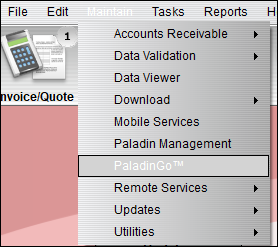
Figure 1: Path to PaladinGo™
Terminals that are active (not deleted in Device Manager) during Paladin’s billing period will be billed (refer to the PaladinGo: Billing KBA).
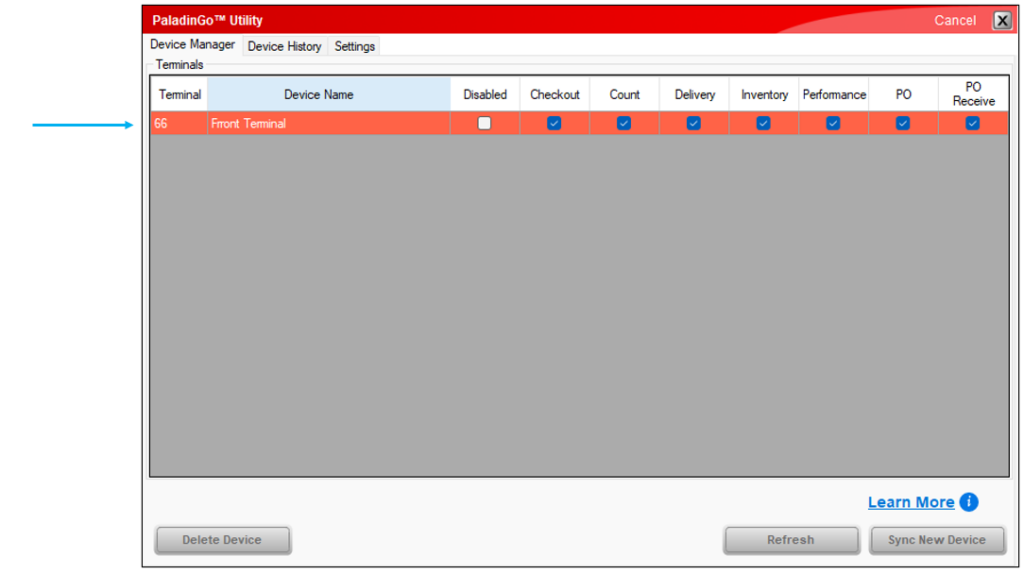
Figure 2: Device Manager
Module selection
The following modules can be checked to be active on a device:
- Disabled: Checking this disables the device but does not remove the device for future use.
- Checkout module active on a device.
- Count module active on a device.
- Delivery module active on a device.
- Inventory module active on a device.
- Performance module active on a device.
- PO module active on a device.
- PO Receive module active on a device.
Each module has a KBA that can be opened through the PaladinGo™ Launchpad KBA.
Learn More
By pressing Learn More , the PaladinGo™ window opens providing a link to the PaladinGo™ KBA, which provides a launchpad to PaladinGo™ modules. Another link is provided to the PaladinGo™ Device Manager KBA, which provides information and instruction on how to select which modules to activate on a device.

Figure 3: PaladinGo™ window
If you have questions or suggestions about this information, contact support@paladinpos.com.