
Discount Analyst is part of the Quick Access menu in Paladin’s Invoice Quote module. The Discount Analyst window that opens provides reasons that contribute to a part being discounted on an invoice. This helps support answer questions for clients, and it also helps clients understand why a part on an invoice is being discounted at that time.
To use the Discount Analyst:
- In Paladin, open the Invoice/Quote module for either an existing or new invoice.
- In the body of the invoice, place your cursor on a part and right click.
The Quick Access menu opens.
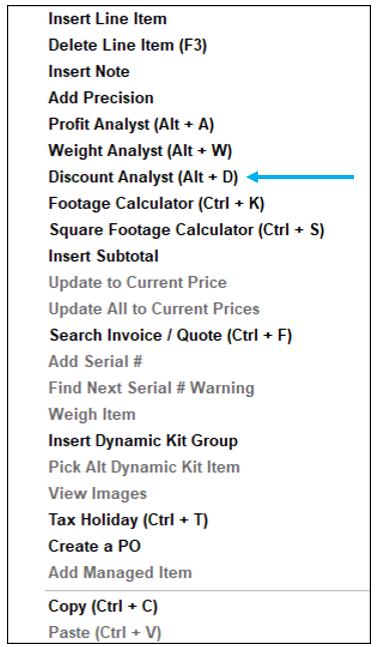
Figure 1: Quick Access/Discount Analyst
- Select Discount Analyst or press Alt + D.
The Discount Analyst window opens with the following columns:
- Part Number
- Pricing Plan
- Reason

Figure 2: Discount Analyst window
Different messages appear for different sale types, discounts, or pricing plans.
** Manual price entry **
Manual Change: “This part’s price has been changed manually.”
Manual change (overrides pricing plan): “This part’s price has been changed manually, overriding the associated pricing plan.”
Manual change (and Ace sale): “This part’s price has been changed manually, and this part is a qualifying item in an Ace sale.”
Manual change (and advanced sale): “This part’s price has been changed manually, and this part is a qualifying item in an advanced sale.”
** Manual Discount (F4) **
Manual Discount: “This part has been discounted by the Discount Item(F4) tool”
Manual Discount (with additional pricing plan): “This part has been discounted by a pricing plan and the Discount Item(F4) tool.”
Manual Discount (with advanced sale): “This part has been discounted by the Discount Item(F4) tool and is a qualifying item in an advanced sale.”
Manual Discount (with Ace sale): “This part has been discounted by the Discount Item(F4) tool and is a qualifying item in an Ace sale.”
** Normal Pricing Plans **
Store-wide pricing plan: “This part has been discounted by a store-wide pricing plan.”
Customer limited pricing plan: “This part has been discounted by a customer limited pricing plan.”
Exclusive pricing plan: “This part has been discounted by an exclusive pricing plan.”
** Advanced Sales **
Advanced sale qualifying item: “This part is a qualifying item in an advanced sale.”
Discount line item (from advanced sale): “This discount applies due to an advanced sale.”
** Ace Sales **
Ace sale qualifying item: “This part is a qualifying item in an Ace sale.”
Discount line item (from Ace sale): “This discount applies due to an Ace sale.”
** Coupons **
Coupon–requirements met: “This discount applies due to a coupon.”
Coupon–requirements NOT met: “This discount does not apply because the invoice does not meet the requirements for the pricing plan.”
** Special **
Part that is not discounted: “This part has not been discounted.”
Part with Net checked: “This part has Net selected and cannot be discounted by a pricing plan.” Note: Advanced sales can still apply and should be shown as a
Non-part (something like a note): “This line item is not a part.”
If you have questions or suggestions about this information, contact support@paladinpos.com.
